Example polls
Paste any of these into the message box in Slack.
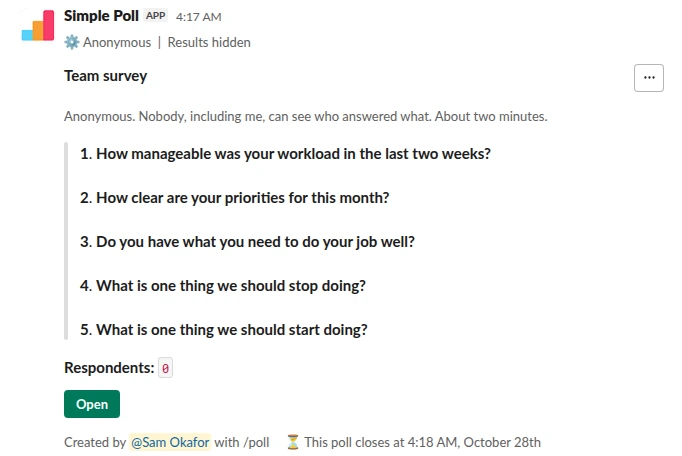
Survey (5 questions). The full anonymous survey. Voters do not see the totals; you share them when you are ready (Premium).
/poll "Team survey" "Anonymous. Nobody, including me, can see who answered what. About two minutes." anonymous hide results close after 3 days remind 1 day before closing --- "How manageable was your workload in the last two weeks?" "Not at all" "Barely" "Somewhat" "Mostly" "Completely" scale --- "How clear are your priorities for this month?" scale --- "Do you have what you need to do your job well?" "Yes" "Mostly" "No" limit 1 --- "What is one thing we should stop doing?" short text optional --- "What is one thing we should start doing?" short text optional
Premium: surveys (several questions), closing automatically, reminders
AnonymousShow results: hidden until poll closesClose automatically: after 3 daysReminder: 24 hours before closing
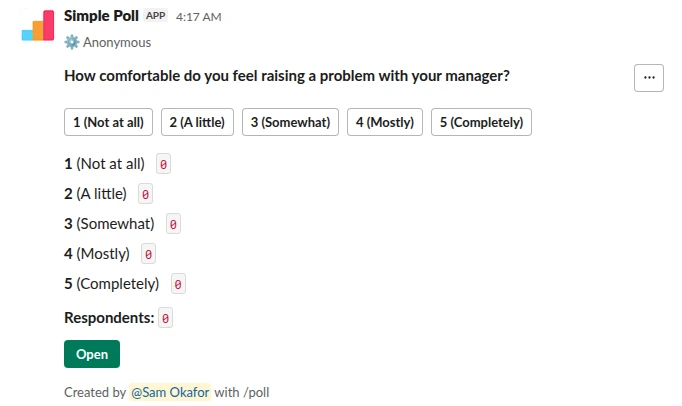
Scale from 1 to 5. One anonymous rating on its own. Free.
/poll "How comfortable do you feel raising a problem with your manager?" "Not at all" "A little" "Somewhat" "Mostly" "Completely" scale anonymous
Free
Anonymous
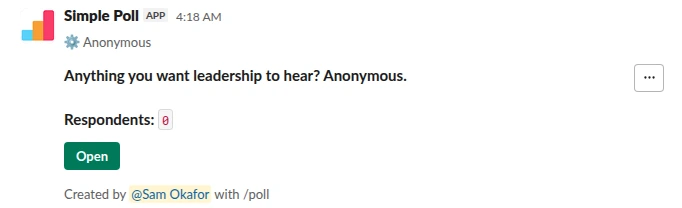
Short text. An anonymous suggestion box. Free.
/poll "Anything you want leadership to hear? Anonymous." short text anonymous
Free
Anonymous
Example questions
Mix ratings, single-choice questions and one open question. Ratings give you numbers to track; the open question tells you why.
- How manageable was your workload in the last two weeks? (1 to 5)
- How clear are your priorities for this month? (1 to 5)
- Do you have what you need to do your job well? (Yes, mostly, no)
- How comfortable do you feel raising a problem with your manager? (1 to 5)
- How do you feel about the recent change to the release process? (Better, no difference, worse)
- Would you recommend this team to a friend looking for a job? (Yes, not sure, no)
- What is one thing we should stop doing?
- What is one thing we should start doing?
- Anything else you want leadership to hear?
How to make people trust it
Say it in the description, in plain words: "Anonymous. Nobody, including me, can see who answered what." People who have answered named polls before will assume this one is named unless told.
Do not ask for details that identify someone in a small team, such as role, location and tenure together. In a team of six, "senior engineer in Berlin" is a name. Leave out demographic questions unless the group is large enough that every answer hides in a crowd.
Add hide results so voters do not see the running totals and early answers do not steer
later ones. On Premium you still see them as the creator, and you share them when you are
ready.
Keep it short
Five to eight questions, about two minutes. Make the open questions optional: required
free-text boxes are where people stop. Give it a deadline with close after 3 days and a
reminder the day before it closes (both Premium), so the results settle while they still
matter.
What to do with the answers
Read the ratings first, then the open answers for the lowest-rated topics. Post a short summary in the channel within a week: what you heard, what you will change, and what you will not change and why. Teams that see nothing happen stop answering the next one.
Never try to work out who wrote a comment. Even guessing out loud breaks the trust that made people honest.
Questions
Can the person who created the survey see who answered?
No. With anonymous, nobody sees who answered what, the creator included. Answers to the
different questions stay together per person, so you can read the comment behind a low
rating, but not whose it is.
Is an anonymous survey free?
Anonymous polls are free on every plan. A survey with several questions is Premium; on Free
you can post single anonymous questions instead. Start a 14-day trial with /simplepoll trial.
Can I send it to people by direct message?
Not with the /poll text, which posts in the channel you type it in. Sending surveys to
individuals by direct message is a Premium feature; see pricing.
Related
- How to create an anonymous poll in Slack
To create an anonymous poll in Slack, type /poll "Your question" "Option 1" "Option 2" anonymous and press Enter. The word anonymous after the last quote hides who voted for what from everyone, including you as the creator. The poll still counts every vote and shows the totals, and it is free on every plan.
- How to create a survey in Slack
To create a survey in Slack, type /poll and press Enter to open Simple Poll's form, add your first question, then click Add more questions for the rest, up to 20. Or type the whole survey as one /poll command with --- between the questions. It posts as one message; people click Open and answer in a pop-up without leaving Slack.
- Weekly pulse survey for Slack
When an annual engagement survey is too slow to catch problems and you want a light, regular read on how the team is doing.
- Anonymous manager feedback survey for Slack
When a manager wants to know how they're doing from the people who report to them, and wants answers more honest than a one-to-one will get.
- What is an anonymous poll?
An anonymous poll records votes without showing who cast them: everyone sees the totals, and nobody can see which person picked which answer. In Simple Poll that includes the person who created the poll.
- What is psychological safety?
Psychological safety is "a shared belief held by members of a team that the team is safe for interpersonal risk taking", as Amy Edmondson defined it in 1999. In practice: people can ask, disagree, admit mistakes and raise problems without fear of embarrassment or punishment.