Step by step
-
List what you'll actually run
Write down the polls and surveys you expect in the first three months: quick decisions, anonymous feedback, a recurring pulse, an engagement survey, event RSVPs. That list decides which features matter, so you don't pay for the rest or miss the one you need.
-
Check what the app can see in Slack
Read the permission scopes the app asks for when it's installed. A poll app needs to post messages and read the votes on its own polls. Ask why it needs anything beyond that, such as channel history or files.
-
Check security and data protection
Look for an independent certification such as ISO 27001, a published list of sub-processors, where the data is hosted, and whether a DPA is available. Your security team will ask for these, so collect them before you request approval.
-
Check the pricing model
Find out whether the price is per user or per workspace, and what happens as the company grows. Per-user pricing pushes you to limit who can create or answer polls, which defeats the point of a company-wide survey.
-
Check the enterprise basics if you need them
If you're on Slack Enterprise Grid, confirm the app can cover the whole org. If procurement needs invoices, purchase orders or a signed MSA, confirm those are offered.
-
Trial it with a real poll
Run something you would run anyway, such as next week's pulse or a real decision, during the trial. How people respond to a real poll tells you more than a feature list.
Example poll
Paste any of these into the message box in Slack.
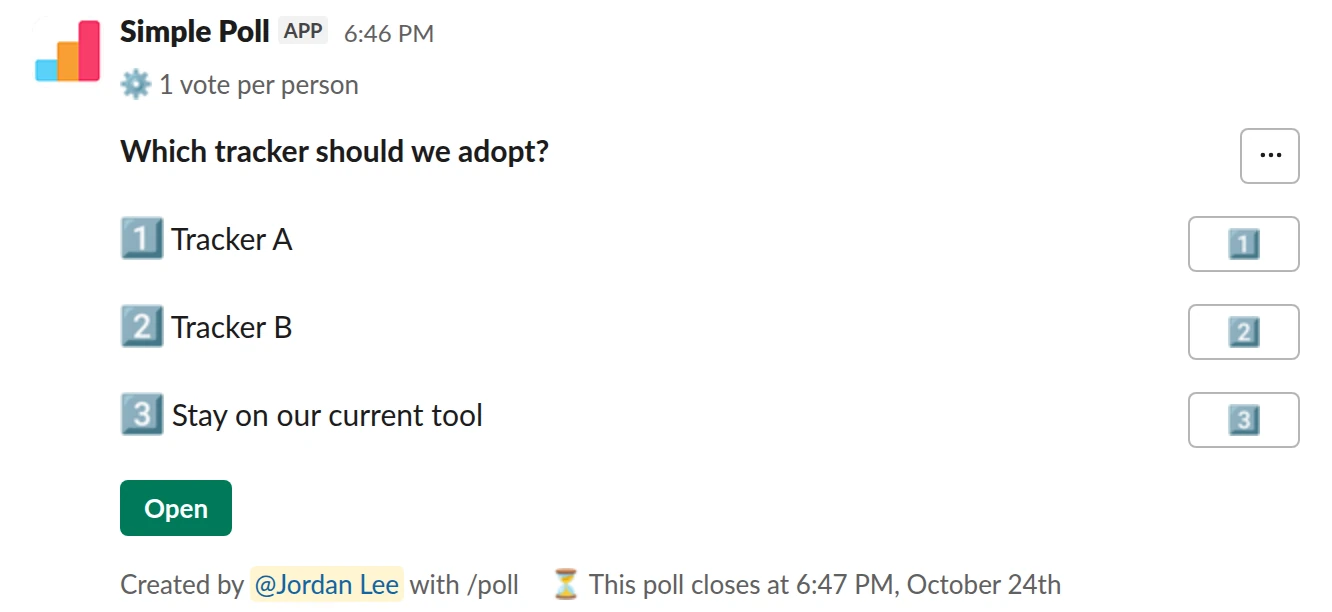
Choice poll. Let the team choose between the finalists once the trial ends (Premium).
/poll "Which tracker should we adopt?" "Tracker A" "Tracker B" "Stay on our current tool" limit 1 close after 2 days remind 1 day before closing
Premium: vote limits, closing automatically, reminders
Limit votes: 1 per personClose automatically: after 2 daysReminder: 24 hours before closing
How Simple Poll answers the checklist
- What it runs: single questions, ranked choice, rating scales, open text, Q&A, and surveys of up to 20 questions. Polls can be anonymous, recurring, scheduled and closed automatically. Surveys and the automation are Premium.
- What it can see: the polls and votes your team creates. No channel history, no files, no DMs. Every permission is explained on the scopes page.
- Security: ISO 27001 certified, data encrypted in transit and at rest, hosted on AWS in the United States, Slack single sign-on for the dashboard. See the security review page.
- Pricing model: Premium is one price per workspace, set by member count, and covers every member. See pricing.
- Enterprise: org-wide coverage on Enterprise Grid, a DPA and MSA, and invoice and PO billing on the Enterprise plan.
- Trial: 14 days of Premium free with
/simplepoll trial(card required, no charge until it ends).
Mistakes to avoid
One is choosing on the longest feature list. The app people actually reach for in a busy channel is the one that's fastest to use, and the one IT will approve.
The other is letting every team install its own poll app. You end up with several vendors to review, several bills, and results spread across tools. Pick one, get it approved once, and tell people it's there. If your workspace restricts apps, the admin steps are in how to review a Slack app request.
Questions
Can't I just use Slack's own features for polls?
For a quick emoji vote, yes. See how to poll in Slack without an app. Anonymous answers, surveys, closing times and exports are what an app like Simple Poll adds.
Who should approve a poll app?
Whoever owns app approval in your Slack workspace, usually IT or a Workspace Owner. Send them the vendor's security and scopes pages with the request.
How long should a trial last?
Long enough to run one real recurring poll at least twice. Simple Poll's Premium trial is 14 days, card required.
Related
- How to review and approve a Slack app request
By default, any member of a Slack workspace can install apps. Turning on app approval means members request apps and a Workspace Owner or an app manager approves or restricts each one. The steps below follow Slack's own help centre; the checks are what a careful reviewer looks at before saying yes.
- Simple Poll or Polly? The questions that settle it
If you're comparing Simple Poll with Polly, this page helps. It doesn't describe Polly: its own website is the right place for that. It gives you the questions that decide it for a company, and Simple Poll's answers, so you can ask the same questions of both.
- What is Simple Poll? A guide for whoever approves it
Simple Poll is a Slack app for polls and surveys. People type /poll in a channel, write a question and options, and the team votes with a click. It's the #1 polls and surveys app in the Slack Marketplace, used by 945,000+ teams with 130 million+ votes cast.
- Simple Poll security review
This page collects what a security or IT reviewer needs to approve Simple Poll in one place. Where a source page exists, it's linked so you can cite it in your review.
- Tool evaluation poll for Slack
When your team is choosing between software tools and the people who will use it every day should have a say.
- How to poll in Slack without an app
Slack doesn't have a poll feature of its own. Its help centre gives two options: install a polling app from the Slack Marketplace, or run a quick, informal poll in a message where people vote with emoji reactions. On paid Slack plans there's a third route, a Workflow Builder form.