Step by step
-
Turn on app approval
In Slack, click Admin in the sidebar, then Apps and workflows, then App Management Settings. Click Edit next to Require approved apps, tick Only allow pre-approved apps and save. On Enterprise Grid this switches on by itself when an Org Owner sets an app management policy.
-
Let members request apps
In the same settings, tick Allow members to request apps for approval. Requiring a comment with each request is worth it: the reason someone wants an app is half of your review.
-
Choose who reviews
Under Select App Managers, choose Workspace Owners and selected members or groups and add the people who should review requests, for example your IT or security team.
-
Review the request
Check what the app does, the permission scopes it asks for, the vendor's security credentials, and who will use it. The checklist below covers what to look for.
-
Approve or restrict, then pre-approve the common ones
Approve or restrict the request. For apps many people will ask for, pre-approve them so members can install without waiting: in Apps and workflows, click Browse, find the app and click Approve.
Example poll
Paste any of these into the message box in Slack.
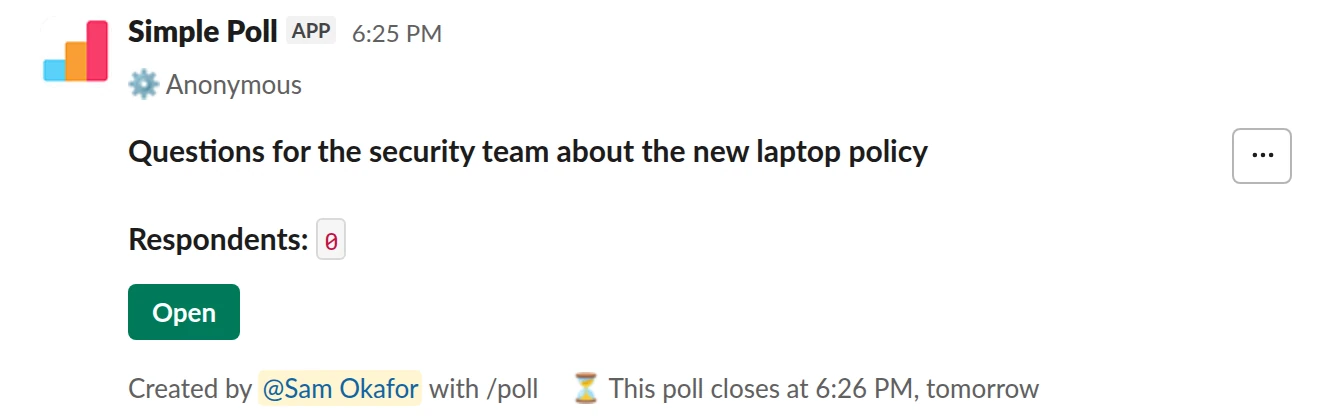
Q&A. An anonymous Q&A for questions to the security team before a policy change (Premium).
/poll "Questions for the security team about the new laptop policy" q&a anonymous close after 1 day
Premium: closing automatically
AnonymousClose automatically: after 1 day
What to check on any app
- Scopes. Each permission should match something the app visibly does. Reading channel history, files or DMs needs a clear reason.
- Certification. An independent security certification such as ISO 27001 tells you the vendor's controls are audited, not just described.
- Data. Where data is hosted, how it's encrypted, and the list of sub-processors.
- Sign-in. Whether the app's web dashboard uses Slack single sign-on or its own passwords.
- Contract. Whether a DPA, an MSA and security questionnaires are available if your policy requires them.
- Who's asking. One person's side project and a request from the People team for a company-wide survey deserve different levels of review.
Simple Poll, worked through
Simple Poll asks for the scopes a poll app needs: commands for /poll, posting messages, joining public channels where it's used, reading names so votes show who voted (on named polls), and reading channel membership so it knows where it's been added. Each one is explained on the scopes page.
It sees the polls and votes your team creates: no channel history, no files, no DMs. It's ISO 27001 certified, encrypts data in transit and at rest, hosts on AWS in the United States, and signs in to its dashboard with Slack. A DPA, an MSA and completed security questionnaires come with the Enterprise plan. Everything a reviewer needs is on one page: the Simple Poll security review.
Questions
Who can approve apps in Slack?
Workspace Owners, plus any app managers they choose under Select App Managers.
Can members install apps without approval?
Yes, by default. Approval only applies once a Workspace Owner turns on Require approved apps, or an Org Owner sets an app management policy on Enterprise Grid.
Where do I send a security questionnaire for Simple Poll?
To [email protected]. Completed questionnaires and security reviews are part of the Enterprise plan; [email protected] can set that up.
Related
- Simple Poll security review
This page collects what a security or IT reviewer needs to approve Simple Poll in one place. Where a source page exists, it's linked so you can cite it in your review.
- What is Simple Poll? A guide for whoever approves it
Simple Poll is a Slack app for polls and surveys. People type /poll in a channel, write a question and options, and the team votes with a click. It's the #1 polls and surveys app in the Slack Marketplace, used by 945,000+ teams with 130 million+ votes cast.
- How to choose a Slack poll app for your company
Posting a question with buttons is the easy part. The differences that matter to a company are elsewhere: what the app can see in Slack, how it's secured, how the price grows with your headcount, and whether it covers surveys and anonymous feedback as well as quick votes.
- Simple Poll for Slack Enterprise Grid
Simple Poll's Enterprise plan is for large organizations, and for any company on Slack Enterprise Grid. It covers the whole Grid org with every Premium feature, and adds the things large companies need to buy and roll out software: a security review, contracts, invoice billing and a person to help.
- What is a slash command?
A slash command is a message that starts with a forward slash, like `/poll`, and runs an app or a built-in Slack action instead of posting text to the channel.